Skip to content
Home
Account Balance
Gift Card
Shipping
Return Information
Contact Us
Home
Account Balance
Gift Card
Shipping
Return Information
Contact Us
Men’s
Corporate
Casual
Outerwear
Ladies
Corporate
Casual
Outerwear
Youth
Scrubs
Men’s Scrubs
Scrub Tops
Scrub Jackets
Scrub Pants
Ladies Scrubs
Scrub Tops
Scrub Jackets
Scrub Pants
More
Last Chance Favorites
Carewear
New Arrivals
Accessories
Men’s
Corporate
Casual
Outerwear
Ladies
Corporate
Casual
Outerwear
Youth
Scrubs
Men’s Scrubs
Scrub Tops
Scrub Jackets
Scrub Pants
Ladies Scrubs
Scrub Tops
Scrub Jackets
Scrub Pants
More
Last Chance Favorites
Carewear
New Arrivals
Accessories
Search
Search
Cart
0
Shopping Cart
has been added to your cart.
has been removed from your cart.
No products added yet
Some Loading Product Name
qty:
00
Price:
$000.00
Remove
Subtotal:
$0.00
Login
Gift Card Tutorial
1. Once logged in, navigate to your account.
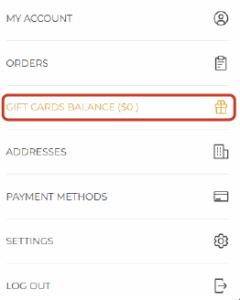
2. Select “GIFT CARDS BALANCE ($XX)” from the menu.
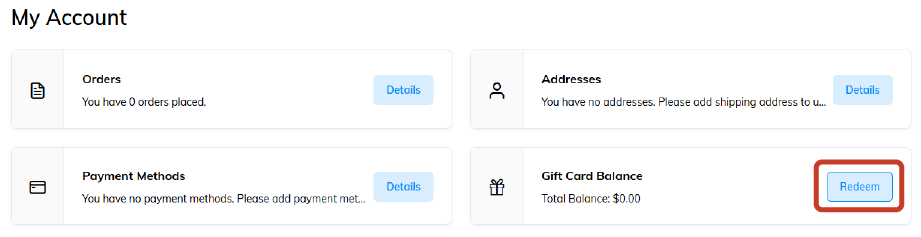
3. Click the “redeem” button from the account options.
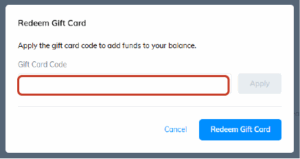
4. Enter your gift card number.
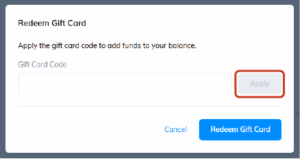
5. Click “Apply” to activate it, if number is entered correctly.
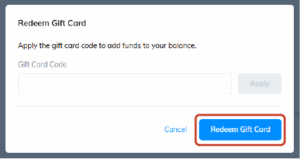
6. Click “Redeem Gift Card” and the money should populate your balance.